![IMG.LY_logo_black_blue (1)-1.png]](https://support.img.ly/hs-fs/hubfs/IMG.LY_logo_black_blue%20(1)-1.png?height=44&name=IMG.LY_logo_black_blue%20(1)-1.png)
You can add members to your IMG.LY subscription to give them access to download and edit license files. This is useful if you want to share access with teammates or collaborator.
-
Step 1: Log in to your IMG.LY dashboard and select the subscription you want to manage.
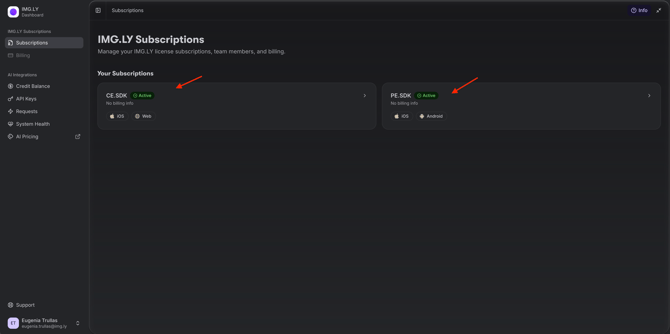
-
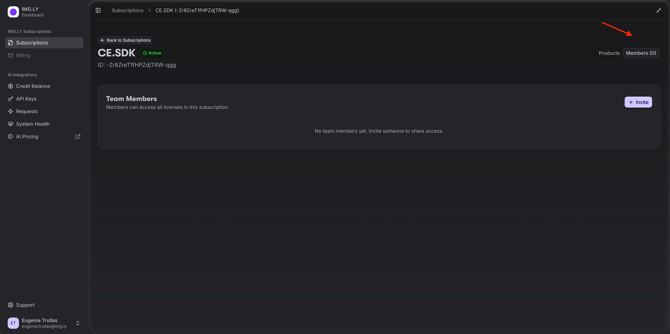
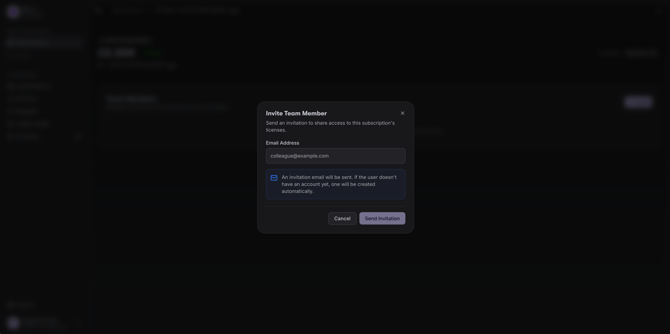
Step 2: Add a new member. In the Members area, click on it and enter the email address of the person you'd like to add
- Step 3: Confirm the email invitation.
Need help more help? If you have further questions, don’t hesitate to reach out to our Support Team. We’re here to help!